Bumpers, Rerailers, and Uncouplers Oh My! -- Update 16
A truly realistic layout needs more than just standard straightaways and curves—it requires operational depth.
Our latest update brings a wave of new possibilities to your design toolkit by introducing specialized track types. From power distribution to high-speed banking, building your dream layout just got a lot more detailed.
New Additions
This update introduces several special-use track pieces to your design: bumpers, rerailers, uncouplers, and power feeder tracks.
Power
Power feeder tracks (also know as terminal tracks) are where the electricity meets the rails. These are the specific points where you connect your power pack wires to the layout.
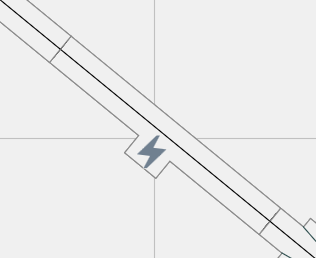
To help you strategically plan your electrical blocks and avoid drops in voltage, power feeders are now clearly identifiable in the app by a lightning bolt symbol.
Rerailers
We all know the frustration of a rogue wheelset ruining an otherwise perfect run. Rerailer are designed to automatically catch and guide derailed wheels back onto the rails. Often modeled as real-world grade road crossings, you can easily spot these in your layout plan by the distinct, angled guide-rail extensions modeled directly onto the track piece.
Bumpers and Buffer Stops
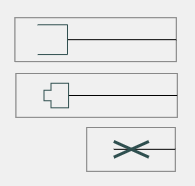
Every spur line, siding, and terminal station needs a safe place for rolling stock to stop. Bumpers prevent your expensive locomotives and cars from accidentally running off the end of dead-end tracks.
We have included distinct visual detailing for these end-of-track pieces, giving you an accurate indication of exactly what type of physical buffer or stop block is being utilized in your plan.
Uncouplers
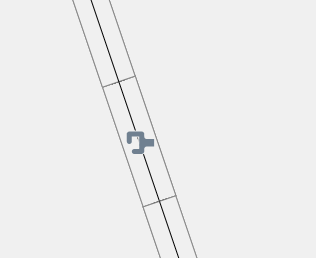
Ready for some serious switching operations? Uncouplers interact with the mechanical couplers on your cars to automatically release them without requiring the “hand of God” to intervene.
When a car stops directly over this track, if all goes as planned, it uncouples seamlessly. In the planner, these pieces are easily identified by a dedicated coupler icon that mirrors the top-down view of a standard knuckle or Rapido box coupler.
Super Elevated Curves
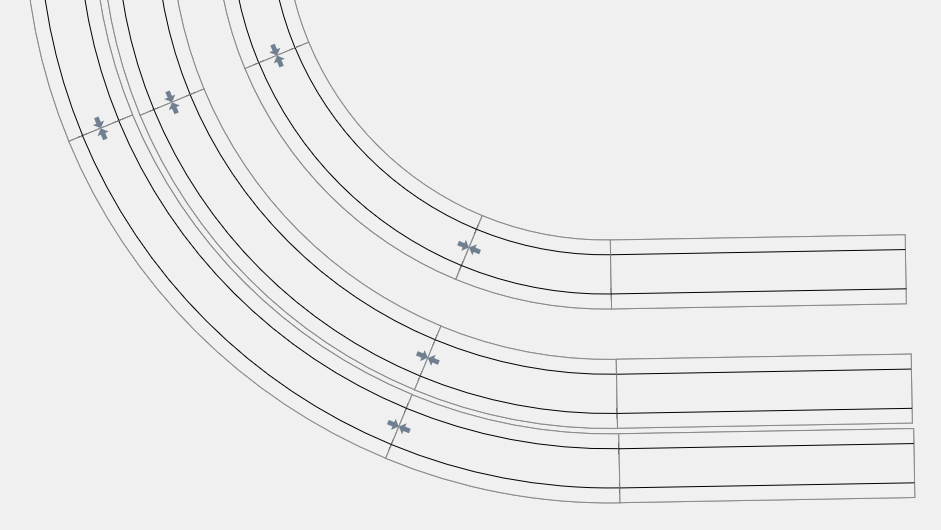
If you love watching modern, high-speed passenger trains or heavy freight fly through the curves, this one is for you. Super-elevated track features rails that are slightly banked toward the inside of the turn. Just like on a real railroad, this physics-defying design helps trains maintain stability and gives them a beautifully smooth, realistic lean.
The super-elevated ends are indicated by a small arrow symbol, matching the physical markings found on the bottom of real Kato track pieces.
Don’t forget that you will need to place the corresponding left and right approach tracks to properly transition your trains from normal flat track into the super-elevated curves!
Ready to Start Planning?
These new pieces are live in the app right now and ready to add a whole new layer of realism to your digital workbench. Open up TrackPlanner.app on your favorite device, update your layout, and see how these specialized pieces can elevate your operations!